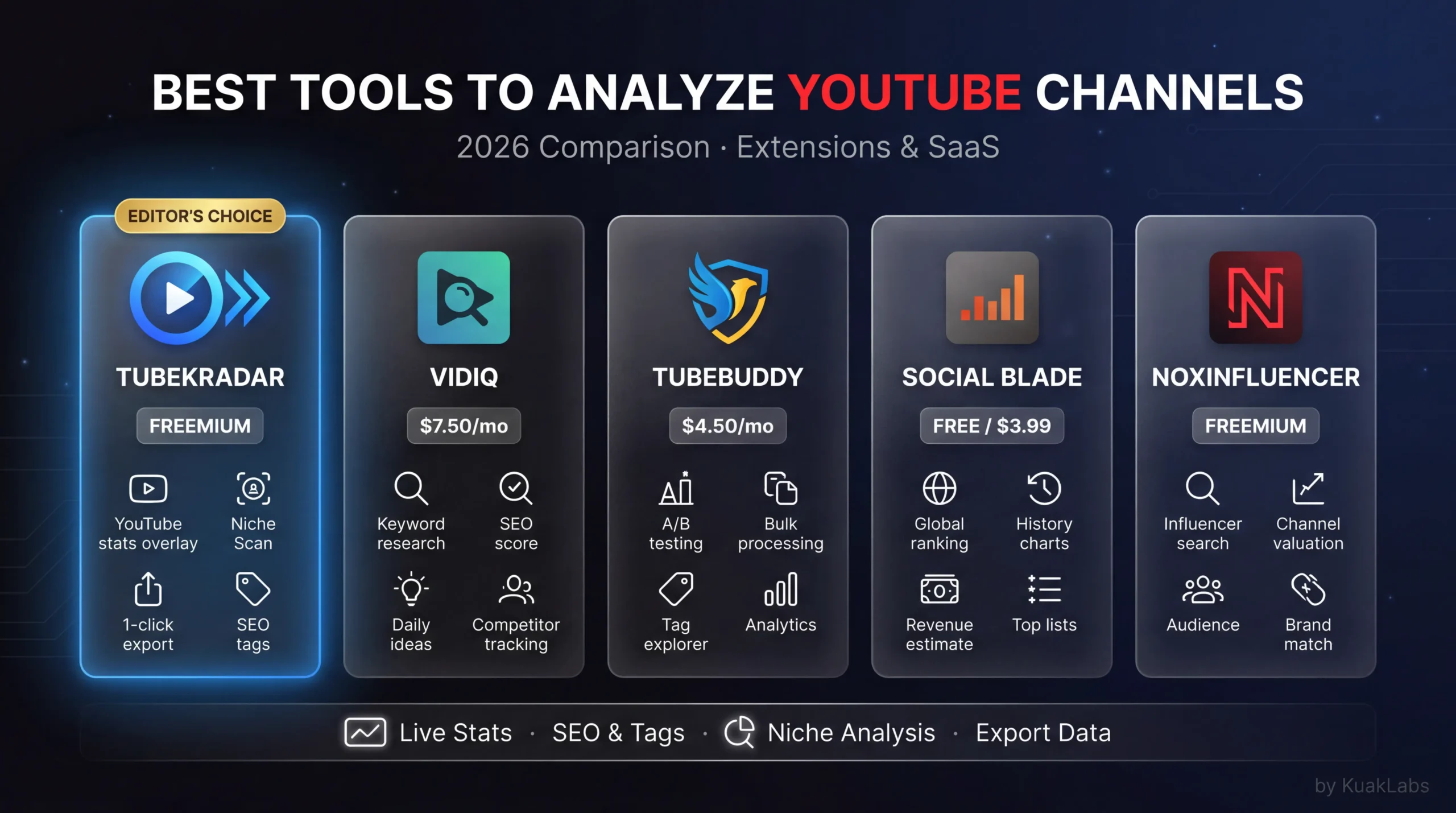
Analyzing YouTube channels serves three different goals: researching the competition, spotting niche opportunities, and estimating a space’s monetization potential. The available tools cover those goals with very different approaches. This comparison explains what each tool does, when to use it, and when not to.
📌 Key takeaways
- YouTube analysis tools split by goal: feed/niche research (TubeKRadar), growth history (Social Blade), own-channel SEO (vidIQ/TubeBuddy).
- TubeKRadar surfaces views/day, CPM, and detected niche directly in the YouTube feed — no tab switch.
- Niche Scan auto-flags 🔥 Hot / 🚀 Exploding / ⚠️ Saturated niches; Niches Radar ships the weekly Top 5.
- Best stack for most creators: TubeKRadar Free for daily research + vidIQ/TubeBuddy for your own channel SEO.
What you can analyze about a YouTube channel
Public YouTube data you can pull without owning the channel:
- Total subscribers and total channel views.
- Number of published videos and individual view counts.
- Publication date of every video.
- Engagement (likes, comments) on individual videos.
From that, tools compute views/day per video (active traction), estimated monthly revenue (with a niche-RPM estimate), channel growth rate, and a video’s relative performance against the channel average. How each tool surfaces those calculations is what separates them.
TubeKRadar (free with AutoKuak Suite)
TubeKRadar is the YouTube analysis module of AutoKuak Suite. It plugs directly into the YouTube interface as a Chrome extension — not a separate tab, the data appears on feed thumbnails and on channel/video pages.
What it shows:
- In the feed: views/day, video age, detected niche, estimated niche CPM.
- On channel pages: estimated monthly revenue panel, performance ratio, growth trend.
- On video pages: current views/day, relative performance within the channel.
Why it’s different from other tools: TubeKRadar doesn’t make you leave YouTube to get data. The information is integrated into the normal browsing flow. As you scroll the feed looking for content ideas, you’re already seeing the data on every visible video. It’s fully free as part of the AutoKuak Suite extension. Revenue calculation detail in how to see YouTube channel revenue.
Social Blade
Social Blade is one of the oldest tools for analyzing social-network channels, including YouTube.
What it does well: subscriber and view growth history, channel-to-channel comparisons, revenue estimates (although with very wide ranges).
Limitations: revenue estimates use a standard RPM that doesn’t account for the niche, leading to very wide ranges (e.g., $1,000–$16,000/mo). It doesn’t show real-time data from the YouTube feed. Separate interface — you have to manually search every channel.
When to use it: to view a specific channel’s growth history over time. Useful for backwards analysis; not for active opportunity detection.
VidIQ
VidIQ is a Chrome extension primarily aimed at YouTube SEO optimization for creators with their own channel.
What it does well: SEO score for your own videos, keyword suggestions for titles and descriptions, competitor tag analysis, YouTube search data.
Limitations: primarily oriented to your own channel, not to competitive analysis. The most useful competitive-analysis features require a paid plan (from $10/mo). It doesn’t show data integrated into the feed for mass niche analysis.
When to use it: if you’re a creator and want to optimize the SEO of your own videos.
TubeBuddy
TubeBuddy is similar to VidIQ in focus: a Chrome extension for creators who want to optimize their channel.
What it does well: A/B testing of thumbnails (almost unique in its category), bulk processing of video updates (tags, descriptions), YouTube keyword analysis.
Limitations: built for creators with an active channel, not for niche research. The most useful features require a paid plan ($9–$49/mo). Doesn’t show data integrated into the feed.
When to use it: if you have an active channel and need management and optimization tools at scale.
Niche Scan (Free 2/day signed in · Pro 100/day)
Niche Scan is different from all the above because its job isn’t to analyze a specific channel — it’s to scan the active YouTube feed systematically.
“Scan Niches” button in the YouTube nav bar → automatic feed auto-scroll → analysis of every visible video → flagging with badges:
- 🔥 Hot niche: good demand, manageable competition.
- 🚀 EXPLODING niche: small channel with multiple recent high-traction videos.
- ⚠️ Saturated: dominated by big channels or high density.
For whom: creators in the niche-research phase who want to assess the market state quickly without a manual process. Detail of what each badge detects in how to know if a niche is saturated.
Niches Radar (AutoKuak Suite’s Pro plan)
Niches Radar isn’t a manual analysis tool but a weekly editorial ranking. Every Monday it ships the Top 5 YouTube niches with the most traction over the last 7 days, computed from a data pipeline that processes thousands of videos daily. The ranking penalizes large channels (>500K subscribers) so only niches accessible to new creators surface.
For whom: creators who want a weekly signal of where demand is growing without doing the analysis themselves.
💡 Want to see live data on your next YouTube session? TubeKRadar is 100% free, no login, install in 30s.
Quick comparison
| Need | Tool | Cost |
|---|---|---|
| Analysis integrated in the YouTube feed | TubeKRadar | Free |
| Specific channel growth history | Social Blade | Free (limited) |
| SEO optimization for your own channel | VidIQ or TubeBuddy | Freemium ($9–$49/mo) |
| Active niche scanning in the feed | Niche Scan | Free 2/day (signed in) · Pro 100/day ($9.99/mo) |
| Weekly ranking of trending niches | Niches Radar | Pro ($9.99/mo) |
Why in-feed analysis is more efficient
External tools (Social Blade, VidIQ) work with a two-step workflow: first you browse YouTube, then you look up the channel or video in the external tool to see the data. TubeKRadar removes that second step. The data shows up in the feed as you browse. For someone researching niches for 30–60 minutes, that friction gap is significant.
For one-off, deep channel analysis, Social Blade still helps. For navigation and niche research in the normal YouTube flow, TubeKRadar is the more efficient option because it doesn’t require context switching. And if the goal is finding profitable niches, both tools complement each other well.
Frequently asked questions
What’s the difference between TubeKRadar and vidIQ or TubeBuddy?
vidIQ and TubeBuddy are built for creators optimizing their own channel (SEO score, keyword suggestions, A/B thumbnail testing). TubeKRadar is built for the market view — niche research, competitor analysis, in-feed metrics on every video without leaving YouTube. Different goals, often used together.
Is TubeKRadar really free with no cap?
Yes. The core in-feed analytics module runs on Free with no daily cap, no signup wall. Niche Scan adds 2 free scans/day after a Google sign-in; Pro lifts that to 100/day plus Niches Radar and the rest of the Studio modules.
Where does the data come from? Is it an official YouTube API?
TubeKRadar reads what’s publicly visible on the YouTube interface (views, channel size, video age) and combines it with calibrated niche-CPM patterns. It’s not pulling private YouTube Studio data (that’s owner-only). It also doesn’t scrape behind authentication — everything stays on the public layer.
Does it work on YouTube Shorts and on mobile?
Yes on Shorts inside the desktop YouTube interface. Chrome extensions don’t run on mobile Chrome, so TubeKRadar is desktop-only — same constraint as vidIQ, TubeBuddy, and most analysis extensions.
Can I use Social Blade and TubeKRadar together?
Yes — they’re complementary. Social Blade gives historical growth curves for a specific channel; TubeKRadar gives in-feed market view of dozens of videos at once. Many serious researchers use Social Blade for backwards analysis on key competitors and TubeKRadar for everyday browsing and niche scanning.
Start analyzing YouTube without switching tabs
AutoKuak Suite’s TubeKRadar is the only tool that surfaces analysis data directly inside the YouTube feed, with no tab switching. Fully free. Niche Scan is also available on Free with 2 scans/day after signing in with Google. For systematic use with 100 scans/day, the weekly Niches Radar ranking and the full Studio (Hooks Radar, Niche Timeline, Profile Matching, Multiniche), the Pro plans start at $9.99/mo.