
Claymation-look videos, generated with AI
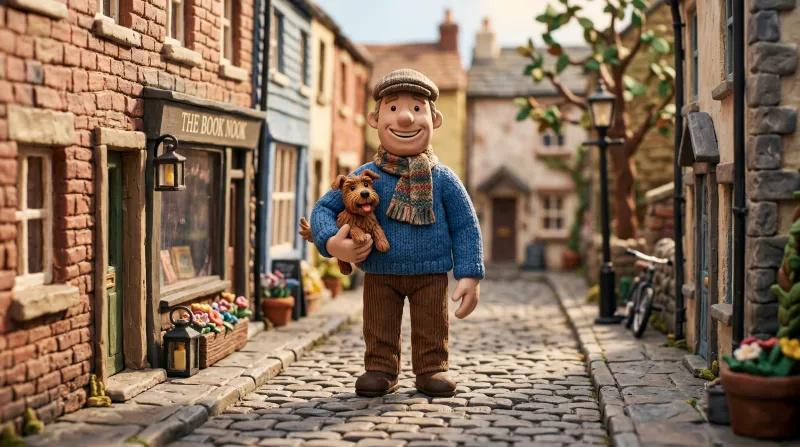
Hand-modelled characters with visible fingerprints and tool marks, lit like a small set. The imperfections are the style.
What it looks like
- Fingerprints and tool marks left on the surface.
- Slightly wonky shapes: nothing is perfect, and that is what sells it.
- Warm close lighting, from a miniature set.
- Matte colours, with no plastic sheen.
What videos it suits
- Videos for a young or family audience.
- Comedy and expressive characters: clay exaggerates the face.
- Fables, tales and short morals.
You write the scene; Studio handles the style
The style is never named in the script. Each line describes what is seen, and this is how one is written:
A tiny clay baker pulls a tray of bread out of a toy oven in a miniature kitchen.
With this style, Studio suggests the Fable voice (expressive and neutral, great for storytelling). You can swap it from the editor for any of the six, and use a different one on each line.
What to watch out for
Clay hands and fingers are the hardest thing to get right: if a scene shows them in close-up, there is a good chance they come out odd. Ask for shots where the hands are busy or out of frame, and regenerate the scene if it does not hold up.
How it is done, step by step
-
Pick the style before generating
When you create a video, Kuak Studio shows a gallery of 58 video templates: nine formats of its own and the 49 visual styles. You pick one and it applies to every scene in the video.
-
Write the script, or ask for one
Each line of the script is a scene. That is where you describe what is seen — who is in it, where, and what happens — never the style: the template already handles that.
-
Studio generates voice, images and captions
The voice is generated line by line and the images scene by scene, all in the same style. The captions come from the voice itself, so they stay in sync.
-
You finish it in the editor
Change a sentence, regenerate only the scene that does not convince you, move the text, add music and export. The editor runs inside your browser and there is nothing to install.
- The style is picked, not written. Kuak Studio applies it to every image in the video; in the script you only describe the scene.
- Images come out with no text inside, on purpose: AI draws warped letters in the wrong language. Titles and captions go on editor layers, where they read properly and can be fixed.
- Each scene is an image the editor gives camera movement to. It is not frame-by-frame animation, and saying so up front avoids expecting something else.
Frequently asked questions
Is it really stop motion?
How is it different from the Clay style?
Does it work for long videos?


Start on the free plan
Sign in with Google and start on the free plan. No card.